
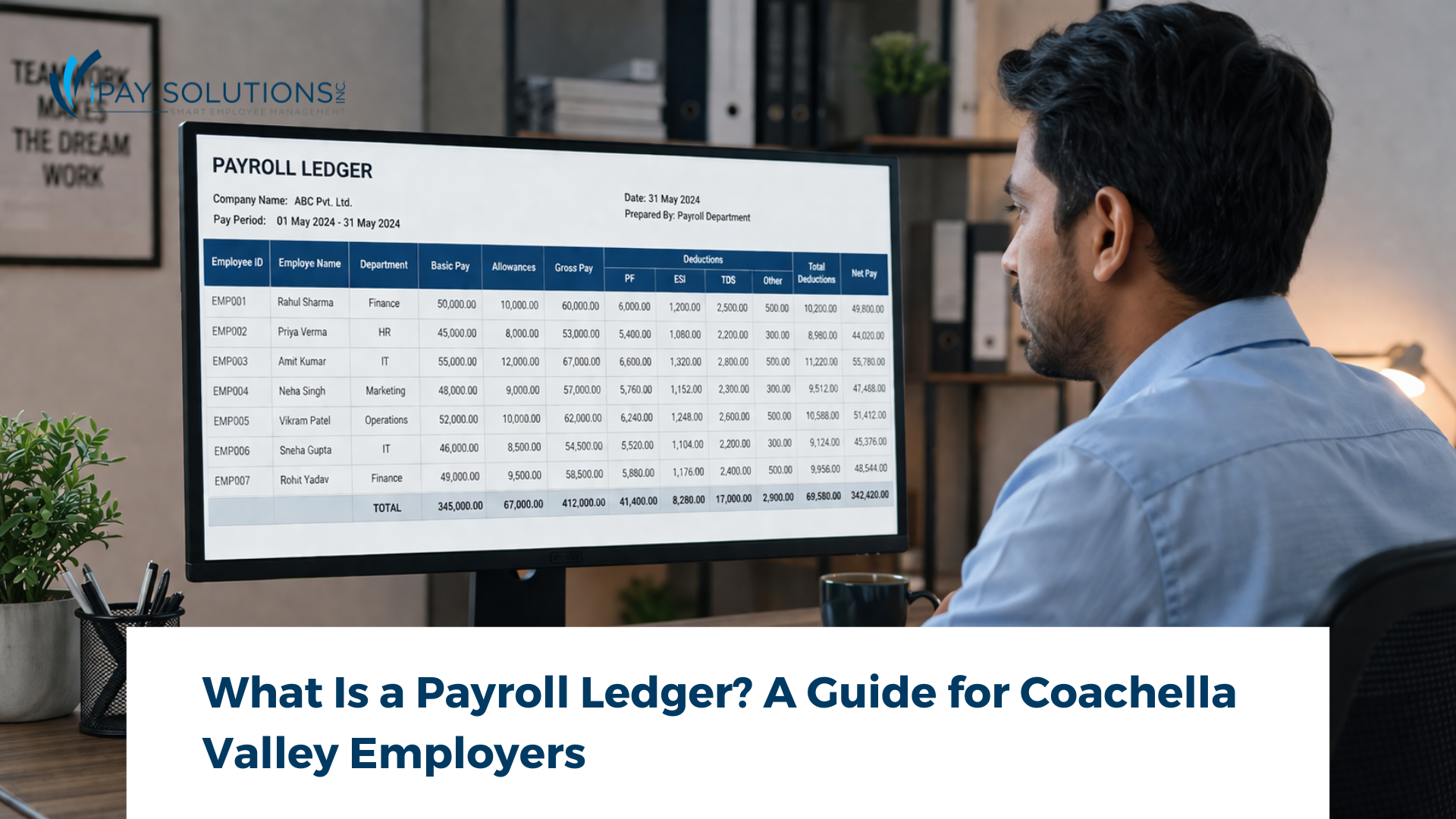
Running a small business in the Coachella Valley means juggling a lot, from managing seasonal staff during the busy tourism months to staying on top of California’s strict wage laws. One foundational tool that keeps your finances in check is a payroll ledger. A payroll ledger is a detailed record of every wage payment, tax withholding, and deduction made to your employees over a given period. Whether you have two employees or two hundred, maintaining an accurate payroll ledger protects you at tax time and in the event of an audit. Here’s everything Coachella Valley employers need to know.
What Is a Payroll Ledger?

A payroll ledger is a running financial record that documents every payment your business makes to its employees. Think of it as the master logbook for compensation. Each entry captures who was paid, how much they earned, what was withheld for taxes and benefits, and the final net amount deposited into their account.
The purpose of a payroll ledger goes beyond simple bookkeeping. It serves as your proof of compliance with federal, state, and local wage laws. It feeds directly into your tax filings. And when questions arise, whether from an employee disputing a paycheck or from a state auditor requesting records, a well-maintained payroll ledger gives you clear, organized answers on the spot.
What Does a Payroll Ledger Include?
Every employee payroll record captured in your ledger should contain a consistent set of data points. While exact formats vary, most payroll ledgers include the following:
- Employee name and ID number for clear identification across pay periods
- Pay period dates (start and end) so every dollar ties to a specific timeframe
- Hours worked, including regular hours, overtime, and any paid time off used
- Gross wages, the total amount earned before any deductions
- Tax withholdings, covering federal income tax, California state income tax, Social Security, and Medicare
- Voluntary deductions such as health insurance premiums, retirement contributions, and garnishments
- Employer tax contributions, including the employer share of FICA, FUTA, and California UI/SDI
- Net pay, the final take-home amount after all deductions
Keeping each of these fields accurate and up to date turns your payroll ledger into a reliable source of truth for your entire business.
Your payroll deserves more than a DIY spreadsheet. Let iPay Solutions take it from here.
Payroll Ledger vs. General Ledger: What’s the Difference?
This is one of the most common questions business owners ask, and the answer is straightforward. A payroll ledger focuses exclusively on employee compensation data: wages, withholdings, deductions, and employer contributions. A general ledger, on the other hand, is your company’s complete financial record. It tracks every transaction across every account, from revenue and expenses to assets and liabilities.
The two work together. Your payroll ledger data flows into the general ledger as summarized journal entries, typically under expense categories like “Salaries and Wages” or “Payroll Tax Expense.” Think of the payroll ledger as a detailed sub-ledger that supports the bigger financial picture your general ledger provides. If the general ledger is the table of contents, the payroll ledger is the chapter on employee pay.
Why Coachella Valley Businesses Need a Payroll Ledger
California already has some of the most demanding payroll regulations in the country, and Coachella Valley employers face a few additional layers of complexity. The region’s resort and hospitality industry relies heavily on seasonal and part-time workers, which means fluctuating headcounts, varying pay rates, and tip reporting throughout the year. Without an organized payroll ledger, tracking all of that becomes a guessing game.
California’s Division of Labor Standards Enforcement (DLSE) requires employers to keep detailed payroll records for at least four years. These records must include hours worked, wages paid, and deductions withheld. Falling short of these requirements can result in penalties, and during an audit, incomplete records put the burden of proof squarely on the employer.
There’s also the matter of programs like California compliance requirements that tie directly into payroll data. From CalSavers retirement contributions to accurate overtime calculations under California’s daily overtime rules, having a clean payroll ledger means you can respond to any regulatory requirement with confidence rather than scrambling through file cabinets.
How to Set Up a Payroll Ledger
Getting started is simpler than most employers expect. Here are three common approaches:
Use a payroll ledger template. Spreadsheet-based templates are a solid starting point for very small businesses. A basic payroll ledger template in Excel or Google Sheets lets you customize columns to match your needs and gives you a visual snapshot of each pay period. The trade-off is that manual entry takes time and leaves room for human error, especially as your team grows.
Invest in payroll software. Dedicated payroll platforms automate calculations, generate reports, and store your employee payroll records digitally. This is a step up from spreadsheets and works well for businesses that want to handle payroll in-house but need guardrails against mistakes.
Outsource to a local payroll partner. For many Coachella Valley employers, the smartest move is handing the entire process to a trusted local provider. When you outsource your payroll, your ledger is maintained automatically, your taxes are filed on time, and your records stay audit-ready without you lifting a finger.
Frequently Asked Questions About Payroll Ledgers
Is a payroll ledger the same as a payroll journal?
They are closely related but not identical. A payroll journal typically records the accounting entries for each payroll run (debits and credits), while a payroll ledger is the cumulative record of all employee compensation details over time. In practice, many small businesses use the terms interchangeably, and some payroll systems combine both functions into a single report.
How long do I have to keep payroll records in California?
California law requires employers to retain payroll records for at least four years. However, the IRS recommends keeping employment tax records for a minimum of four years after the tax becomes due or is paid, whichever is later. To stay safe on both fronts, many accountants advise holding onto records for at least six years.
Do small businesses need a payroll ledger?
Yes, without exception. If you have even one employee, you are required to maintain payroll records under both California and federal law. A payroll ledger is the most organized way to meet those requirements. It also makes tax season faster and protects your business if a dispute or audit arises.
What is the difference between a payroll ledger and a general ledger?
A payroll ledger is a specialized record that tracks only employee compensation data. A general ledger captures all financial transactions for the entire business. Payroll ledger totals are posted to the general ledger as summary entries. Both are essential, but they serve different purposes in your accounting workflow.
Keep Your Books Clean: Let iPay Handle the Details
A payroll ledger is more than a record-keeping formality. It’s your business’s first line of defense against compliance headaches and costly errors. For Coachella Valley employers navigating California’s complex payroll rules, staying organized is non-negotiable. Whether you’re managing a restaurant in Palm Springs or a boutique in La Quinta, accurate payroll records save time and protect your bottom line.
Want to simplify the process entirely? Learn more about how iPay Solutions handles payroll for local businesses so you never have to worry about spreadsheets again.
When you’re ready to stop managing spreadsheets and start growing, get a quote from iPay Solutions and see how we make payroll effortless for Coachella Valley businesses.